

















< Previous | Contents | Manuals Home | Boris FX | Next >
Edit Room Tab Dialog
Used to edit the effect of clicking on a Room tab.
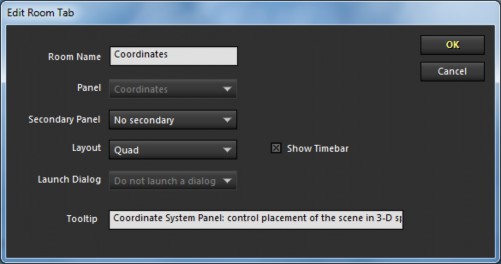
Room Name. The name of the room displayed on the row of tabs.
Panel. Select the panel that should be selected when entering the room. This selector is grayed out for pre-defined rooms. For user-added rooms, you can also select Do not change or No panel .
Secondary Panel. Select the second panel that should be selected when entering the room (if space permits), or none. Used to stack a lens panel under the solve panel, for example.
Layout. Selects which layout should be selected upon entering the room, or Do not change.
Show Timebar. Whether or not the time bar should be displayed for this room. Launch Dialog. Select one of these dialogs to be opened when you enter the room. Tooltip. Tooltip displayed for the room when the mouse hovers over its tab.
©2026 Boris FX, Inc. — UNOFFICIAL — Converted from original PDF.
